Meet the Echo Refresh™
The Echo Refresh™ is a hydrogen inhalation system designed to generate a controlled mixture of molecular hydrogen (H₂) and oxygen (O₂) for inhalation.
📘 What are the benefits of hydrogen inhalation?
During a session, the Refresh produces these gases from distilled water through electrolysis and delivers the generated gases through its designated output ports.
What Makes the Echo Refresh™ Different?
The Refresh combines hydrogen generation, intelligent controls, multiple output connections, and built-in monitoring into one easy-to-use system.
-
2-in-1 Hydrogen & Oxygen Gas Generation
The Refresh generates hydrogen and oxygen simultaneously, providing a mixed gas output for your inhalation session. -
Three Output Ports
(2) H₂ & (1) O₂ output connections provide flexibility when setting up your Refresh and compatible accessories. Always use the ports and accessories according to the instructions provided in this manual. -
Built-In Safety Monitoring
The operating system continually monitors key machine functions and includes built-in alarms designed to alert you when the unit detects certain operating conditions that require attention. -
Stunning TFT Touch Display
The integrated display provides an easy-to-navigate interface for operating the machine and viewing important information during your session. -
Advanced Operating System
Internal software manages machine operation, monitors components, supports safety functions, and provides firmware management for continued system performance. -
Quality-Assurance Testing
Each Refresh undergoes a quality-assurance inspection before leaving the manufacturing process to help verify proper operation and performance. -
Durable, Energy-Conscious Construction
The aluminum housing provides a lightweight, corrosion-resistant exterior, while the power system is designed to provide reliable operation with efficient energy use. -
Quiet & Relaxing Operation
The cooling and reservoir systems are designed to minimize operating noise, making the Refresh suitable for use during relaxing activities such as reading, meditation, or simply unwinding. -
Testing & Compliance
Third-party verification ensures hydrogen and oxygen purity. CE, FCC, RoHS, and FDA certifications confirm compliance and quality.
Product Specifications
| Feature | Specification |
|---|---|
| Purity | 99.999% Hydrogen & Oxygen |
| Type of Water Needed | Distilled |
| Max Hydrogen Output | 1200 ml/min |
| Max Oxygen Output | 600 ml/min |
| Water Tank Capacity | 2.6 L / 11 cups |
| Input Power | 110–240V @ 6A |
| Power Consumption | 470 W |
| Dimensions (H×W×D) | 15 × 10 × 14 in |
| Touch Screen Dimensions | 7-inch TFT display |
| Weight | 27.75 lbs / 32.75 lbs with 10 cups of water |
| Manufacture Location | China |
⚠️ Important Machine Guidelines
Your safety is important. Before operating the Echo Refresh™, please read this section carefully and follow these precautions every time you use, refill, move, or store the machine.
💧 Water Quality & Filling
The quality of the water placed inside the Refresh is important for the performance and longevity of the electrolysis system.
- Use distilled water only. Do not use tap, spring, purified, or filtered drinking water. Distilled water is required because it contains very low levels of Total Dissolved Solids (TDS), such as minerals, salts, and other dissolved substances that can interfere with the electrolysis system or contribute to buildup over time.
- Water used in the machine should meet the following specifications: Resistivity >2 MΩ·cm | Conductivity <0.5 µS/cm.
- Never add anything to the water. Do not add minerals, electrolytes, supplements, flavorings, cleaning agents, essential oils, medications, or other substances unless specifically instructed by Echo Water for an approved maintenance procedure.
- Never open, modify, or disassemble the electrolysis cell or other internal components.
Why distilled water matters: The water inside the Refresh isn't drinking water—it is part of the machine's hydrogen-generation system. Using the correct water helps protect the electrolysis components and maintain consistent operation.
🔥 Hydrogen, Oxygen & Fire Safety
The Refresh generates hydrogen (H₂) and oxygen (O₂) during operation. Hydrogen is flammable, so proper placement and ventilation are essential.
- Always operate the Refresh in a well-ventilated indoor area.
- Never operate or store the machine near an open flame, lit cigarette, candle, fireplace, gas burner, or other ignition source.
- Keep the machine away from equipment or activities that may produce sparks or excessive static electricity.
- Do not operate the Refresh in a small, enclosed, or poorly ventilated space where generated gases could accumulate.
- Keep the machine away from dusty environments, corrosive gases, and combustible or flammable materials.
- Use additional caution around oxygen-enriched environments or supplemental oxygen equipment. Oxygen supports combustion, while hydrogen is flammable; unsafe concentrations or an ignition source can increase fire risk.
⚡ Electrical Safety
Because the Refresh combines water with powered electrical components, proper electrical setup is especially important.
- Connect the Refresh only to a properly grounded electrical supply that meets the machine's specified electrical requirements.
- Keep the power connection, plug, cord, and surrounding area clean and dry.
- Never connect or disconnect electrical components with wet hands.
- Do not operate the machine if the power cord, plug, electrical connection, or housing appears damaged.
- If you notice unusual heat, a burning smell, smoke, sparking, or electrical discoloration, turn the machine off, disconnect power if it is safe to do so, and discontinue use until the unit has been evaluated.
📦 Moving or Transporting Your Refresh
Always drain the water from the machine before transporting or relocating it.
Water left inside during transportation can move into areas where it doesn't belong and potentially damage internal components. Keep the Refresh upright whenever possible and handle it carefully when moving it from one location to another.
🫁 Health & Medical Considerations
Hydrogen inhalation is an evolving area of scientific research, and controlled clinical evidence in humans remains limited for many proposed health applications.
If you have a lung or cardiovascular condition, use supplemental oxygen or another respiratory device, are pregnant, or have another medical condition that could affect breathing or oxygen use, consult an appropriately qualified healthcare professional before beginning hydrogen inhalation.
The Echo Refresh™ is intended to support a wellness routine and should not be used as a substitute for medical evaluation, diagnosis, treatment, prescribed medication, or prescribed respiratory therapy.
Important: Never modify, combine, or connect the Echo Refresh™ to supplemental oxygen equipment, CPAP/BiPAP equipment, ventilators, nebulizers, or other medical or respiratory devices unless that specific configuration is expressly approved for the Refresh.
🌡 Operating Conditions & Proper Placement
The environment where you use your Echo Refresh™ can affect both its performance and longevity. Before beginning a session, make sure the machine is positioned correctly and operating within the recommended conditions below.
Recommended Operating Conditions
-
Operating Temperature: 36°F–175°F (2°C–79°C)
The temperature of the water inside the machine may naturally increase during operation. This is expected as the electrolysis system generates hydrogen and oxygen. -
Water: Distilled water only
Do not use tap, filtered, spring, mineral, or purified drinking water unless it meets the required specifications for the Refresh. -
Total Dissolved Solids (TDS): 0–6 ppm
TDS refers to the amount of dissolved minerals, salts, metals, and other substances present in water. The Refresh requires extremely low-TDS water for proper operation. If the TDS becomes too high, the machine's monitoring system may display an error code to help protect the electrolysis system.Helpful tip: Even distilled water can pick up dissolved material from an unclean container or through contamination. Always use fresh distilled water from a clean container, and never pour previously removed water back into the machine.
-
Relative Humidity: Less than 85%
Avoid operating the Refresh in excessively humid or damp environments. Keep the machine and all electrical connections dry.
Proper Machine Placement
Always operate the Echo Refresh™ upright on a flat, stable, and level surface. Proper positioning helps the internal water and gas systems function as designed.
Choose a location that:
- Provides enough space around the machine for unrestricted airflow and ventilation.
- Keeps the air intake and ventilation openings unobstructed.
- Is away from direct sunlight, heaters, fireplaces, open flames, and other heat or ignition sources.
- Is dry and protected from splashing or standing water.
- Allows the machine to remain upright and secure throughout the entire session.
- Is away from the edge of tables or counters where the unit could accidentally be bumped or knocked over.
Keep the Refresh Stationary During Operation
Once the Refresh contains water, do not shake, tilt, tip, or move the machine while it is operating. Movement can cause water to shift within the system and may interfere with normal operation.
If you need to relocate or transport the Refresh, turn the machine off and follow the draining instructions in this manual first. Always drain the water before transporting the unit. Refer to the Echo Refresh™ Cleaning and Maintenance section for draining instructions.
📦 Echo Refresh™ — What’s Included
Before setting up your Echo Refresh™, take a moment to unpack the box and confirm that all components and accessories are present. Keeping the original packaging is also recommended in case you ever need to safely transport or store your machine.
Your Echo Refresh™ includes:
-
Echo Refresh™ Machine
The main hydrogen and oxygen generation unit.-
Travel Caps — Pre-Installed
The travel caps are installed before shipping to help prevent residual water or moisture from leaking during transportation. These are intended for transportation and should be removed from the appropriate connections during setup as directed later in this manual. Keep them in a safe place—you will need them again if the Refresh is stored or transported. -
Two Side Handles
Convenient handles are located on the sides of the machine to provide a secure grip when lifting or repositioning the Refresh. Always drain the machine before transporting it.
-
Travel Caps — Pre-Installed
-
Power Cord — 1
Connects the Echo Refresh™ to its required electrical power source. Use only a compatible power cord and a properly grounded outlet with a surge protector. -
Hydrogen Absorption Tubes (Nasal Canulas) — 2
These are the individual nasal cannulas used to comfortably deliver the generated hydrogen and oxygen gas mixture for inhalation. -
3-Way Tubes — 2
Used to divide the gas flow into multiple connections when setting up the inhalation tubing. -
4-Way Tube Connector — 1
Provides additional connection points for configuring the supplied tubing and accessories. -
1-Meter Silicone Tube — 1
Flexible tubing used as part of the gas-delivery connection between the Refresh and compatible inhalation accessories. -
Spare Fuses — 2
Replacement fuses are included in case a fuse needs to be replaced during the life of the machine. Only replace a fuse with the correct type and rating specified for the Echo Refresh™. Never bypass a fuse or substitute one with a different electrical rating.
Before Your First Use
Once everything is unpacked, do not discard the travel caps, spare fuses, or original packaging. Store these components somewhere you can easily find them later.
Before connecting any tubing, take a moment to inspect the machine, power cord, and accessories for visible shipping damage. If something appears damaged or an accessory is missing, do not attempt to substitute an unapproved component. Contact Echo Water Support so we can help identify exactly what you need.
Helpful tip: The different tubes and connectors can look similar when you're first unpacking everything. The setup section that follows will show where each component connects, so there is no need to guess or force a tube onto a connection that doesn't seem to fit.
Echo Refresh™ Setup and Testing Instructions
1. Unbox and Inspect the Machine
- Carefully remove the Echo Refresh™ and all accessories from the packaging.
- Inspect the machine for any visible damage that may have occurred during shipping.
- Remove the three protective plugs from the hydrogen and oxygen ports on top of the machine.
- Keep the protective plugs in a safe place for future storage or transportation.
2. Fill the Water Tank
- Remove the black water-tank cap from the top of the machine. The cap pulls straight off—no twisting required.
- Slowly fill the tank with distilled water until the water reaches the fill line. The tank holds approximately 11 cups (2.6 liters).
Important:
- Use only distilled water. Distilled water contains the lowest level of total dissolved solids (TDS), helping protect the machine and maintain proper operation.
- Use the water-level window on the side of the machine to monitor the tank as you fill it.
- If the water level is difficult to see, shine a light through the fill opening to illuminate the tank.
- Do not underfill or overfill the tank. If too little or too much water is added, the machine will display an error, and the excess water must be drained before use. Refer to the Echo Refresh™ Cleaning and Maintenance section for draining instructions.
- Once the tank is filled, securely replace the water-tank cap.
3. Connect the Power
- Connect the provided power cord to the machine.
- Make sure the power connection and surrounding area are clean, dry, and free of debris.
- Plug the power cord into a surge protector. A surge protector is recommended but is not included.
- Locate the red power switch on the back of the machine and move it to the ON position.
- The touchscreen will illuminate and display the Echo Water logo.
- Tap the Echo Water logo to continue to the main control screen.
4. Test the Airflow
Before connecting the tubing, verify that air is flowing through the hydrogen and oxygen outlet ports:
- Briefly cover one port opening at a time for 5–10 seconds.
- Release the port. You should hear a small puff of air.
- Repeat as needed to confirm airflow from each port.
Please note:
- Airflow from the center oxygen port may feel weaker than airflow from the two hydrogen ports. This is normal.
- Oxygen will not flow when the water-tank cap is removed. Make sure the cap is securely in place before testing the oxygen port.
5. Connect the Tubing
Locate the four-way connector and tubing assembly, then connect the tubing as follows:
- Short center tube: Connect to the oxygen port in the center.
- Two longer tubes: Connect to the hydrogen ports on the left and right.
- Nasal cannula: Connect to the remaining opening on the four-way connector.
Make sure every connection is secure and that the tubing is not pinched, twisted, or kinked.
✅ Your Echo Refresh™ is now set up and ready for use.
Echo Refresh™ Operation Guide
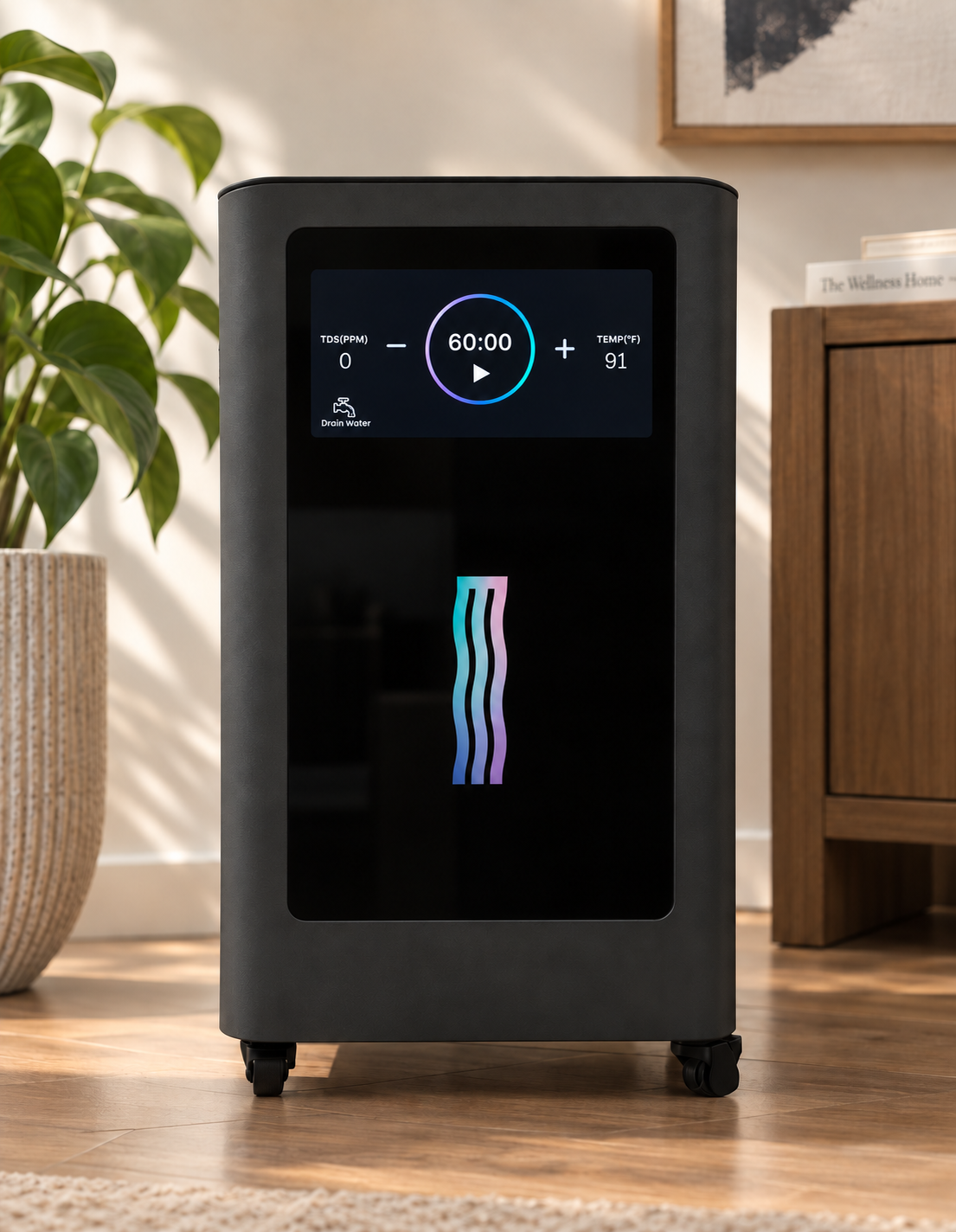
1. Check the Water Level
Before each session, check the water level using the window on the side of the machine.
- Keep the water tank approximately two-thirds full for optimal performance.
- Use distilled water only.
- Add the required amount of distilled water through the fill opening on top of the machine.
- Never operate the Echo Refresh™ without water.
- Water may be added while the machine is operating if the level becomes low.
- Depending on usage, the tank will typically need to be refilled approximately once per month.
- The touchscreen will display an alert if the water level is too low or too high.
Important: Do not overfill the tank. If the water-level alert appears, add or drain water as directed before continuing.
2. Turn On the Machine
- Connect the provided power cord to the machine.
- Make sure the power connection and surrounding area are clean, dry, and free of debris.
- Plug the power cord into an appropriate outlet or surge protector.
- Locate the red power switch on the back of the machine and move it to the ON position.
- The touchscreen will illuminate and display the Echo Water logo.
- Tap the Echo Water logo to open the Function Display.
3. Set the Session Timer
- The default session time is 30 minutes.
- Tap the + or – controls to adjust the session time.
- The timer adjusts in 30-minute increments, up to a maximum of 360 minutes.
- The flow rate is fixed at 1,800 mL/min—1,200 mL/min of hydrogen (H₂) and 600 mL/min of oxygen (O₂)—and cannot be adjusted.
- Once the desired session time is displayed, the machine is ready to begin.
4. Position the Nasal Cannula
- Inspect the cannula. Make sure the tubing is fully connected, untangled, and free of kinks.
- Position the nasal prongs. Hold the cannula with the prongs curving downward.
- Insert the prongs. Gently place the soft prongs inside your nostrils with the openings directed toward the back of your nose.
- Loop the tubing over your ears. Rest the tubing comfortably over the top of each ear.
- Adjust the fit. Slide the adjuster upward beneath your chin until the cannula feels secure but not tight.
5. Begin Your Session
- Confirm that the tubing is connected correctly for your selected hydrogen and oxygen configuration.
- Make sure the cannula is positioned comfortably.
- Press the Play ▶ button to begin the session.
- The timer will count down from the selected session time.
- When the session is complete, remove the cannula and turn off the machine if it will not be used again immediately.
Please note: The LED lights are decorative and do not indicate gas production or treatment strength.
⚠️ Important: Never cover, cap, or block an active gas-output port while the machine is operating.
Quick Tips
- Check the water level before every session.
- Refill the tank before the water level becomes low to help prevent interruption or error messages.
- Use only distilled water and keep the tank approximately two-thirds full.
- Make sure all tubing is securely connected and free of twists or kinks.
- Adjust the nasal cannula so it fits comfortably without pinching or restricting airflow.
Echo Refresh™ Available Modes
You can change the modes by simply adjusting the tube configuration. The Echo Refresh™ has three gas-output ports:
- Two hydrogen (H₂) ports
- One oxygen (O₂) port
The machine can deliver a combined hydrogen-and-oxygen mixture, hydrogen only, or oxygen only.
Combined Hydrogen and Oxygen—Brown’s Gas
- Connect both hydrogen tubes and the oxygen tube to the machine.
- All three tubes must remain connected to the four-way connector during use.
- Connect the nasal cannula to the remaining opening on the four-way connector.
Hydrogen Only
- Connect the two hydrogen tubes to the left and right hydrogen ports.
- Disconnect the oxygen tube from the center oxygen port.
- Leave the oxygen port open and unobstructed so the unused oxygen can safely dissipate into the surrounding air.
Oxygen Only
- Disconnect the four-way connector.
- Connect the end of the nasal cannula tubing directly to the center oxygen port.
- Leave both hydrogen ports open and unobstructed so the unused hydrogen can safely dissipate into the surrounding air.
Important: Always operate the Echo Refresh™ in a well-ventilated area. Keep the machine and all gas-output ports away from flames, sparks, smoking materials, and other ignition sources. Never cover or block an unused port while the machine is operating.
Two-Person Hydrogen Mode
- The Echo Refresh™ includes two nasal cannulas, allowing two people to use hydrogen simultaneously.
- Disconnect the four-way connector and all tubing from the three gas-output ports.
Connect one nasal cannula directly to the left hydrogen port.
- Connect the second nasal cannula directly to the right hydrogen port.
- Leave the center oxygen port open and unobstructed so the unused oxygen can safely dissipate into the surrounding air.
Important: Always operate the Echo Refresh™ in a well-ventilated area. Keep the machine and all gas-output ports away from flames, sparks, smoking materials, and other ignition sources. Never cover or block an unused port while the machine is operating.
Alerts & Alarms
If an alert appears on the touchscreen, follow the recommended action below before continuing operation.
| Alert Message | Recommended Action |
|---|---|
| “TDS Is High” | Drain the water tank completely, then refill it with fresh distilled water. |
| “High Water Level” | Drain a small amount of water until the alert clears. |
| “Please Add Water” | Add distilled water to the tank until the proper fill level is reached. |
| “Please Increase Time” | Set the session timer for at least 30 minutes. |
| “High Temperature” | Check that the cooling fan is operating and that the ventilation openings are not blocked. Turn off the machine and allow it to cool for at least 30 minutes before restarting it. |
Temperature Note: The machine’s internal operating temperature may range from room temperature up to 175°F (79°C). If the High Temperature alert remains after the machine has cooled, discontinue use and contact Echo Water Customer Support.
Echo Refresh™ Cleaning & Maintenance
The Echo Refresh™ requires distilled water, which helps reduce mineral buildup and contaminants inside the machine. However, distilled water does not eliminate the need for routine water changes and cleaning.
Regular maintenance helps preserve performance, prevent buildup, and extend the life of the machine.
Water Trap Cleaning
Check and clean the water trap regularly:
- Open the teal connector to drain any collected water.
- Rinse the water trap with a mixture of white vinegar and water.
- Rinse thoroughly and reconnect it securely before using the machine.
Routine Water Changes
Replace the water after every 20 hours of operation or once per week, whichever comes first.
- Drain the tank using the automatic drain outlet on the back of the machine.
- Refill the tank with fresh distilled water.
- Drain and refill the tank two to three times.
- Complete the process with a final refill of fresh distilled water.
Deep Cleaning
Perform a deep cleaning whenever the machine has been stored for an extended period or requires more thorough maintenance.
- Turn off the machine and unplug it from the power outlet.
- Fill the tank with Echo Clean or an equal-parts mixture of white vinegar and distilled water.
- Allow the cleaning solution to remain in the tank for at least 15 minutes. For a deeper cleaning, it may remain in the tank overnight.
- Do not operate the machine or begin a session while the cleaning solution is inside the tank.
- Drain the tank completely.
- Refill the tank with fresh distilled water, then drain it again.
- Repeat the distilled-water rinse two to three times to remove all remaining cleaning solution.
- Complete the process with a final refill of fresh distilled water.
How to Drain the Machine
- Locate the automatic drain outlet on the back of the machine.
- Remove the plug from the automatic drain outlet.
- Position the drain tubing or outlet over a suitable container.
- Turn on the machine and tap Drain Water on the touchscreen.
- Allow the machine to pump the water out automatically.
- When draining is complete, reinstall the drain-outlet plug securely.
Important: A small amount of moisture around the bottom of the machine may occur during draining. Wipe it dry promptly, and never soak or immerse the machine in water.
Long-Term Storage
- Store the machine with a small amount of distilled water remaining in the tank.
- Do not leave the machine completely dry for longer than one year.
- If the machine has not been used for an extended period, complete the Deep Cleaning procedure before using it again.
- Before returning the machine to regular use:
- Fill the tank with fresh distilled water.
- Allow the water to remain in the tank for 24 hours.
- Drain the tank completely.
- Refill and drain the tank three to four times.
- Complete the process with a final refill of fresh distilled water.
Reminder: Consistent water changes and routine cleaning help maintain proper operation and prolong the life of your Echo Refresh™.
Echo Refresh™ Troubleshooting & FAQs
Review the troubleshooting steps below before contacting Technical Support. If the issue continues, email support@echowater.com.
1. The Machine Will Not Power On
Confirm the following:
- The power outlet is working.
- The power cord is firmly connected to both the machine and the outlet or surge protector.
- The power switch on the back of the machine is in the ON position.
Check the Fuse
The fuse holder is located on the back of the machine, directly above the power-cord connection.
- Turn off the machine and unplug the power cord.
- Use a small flathead screwdriver to gently open the fuse holder.
- Remove the fuse and inspect it for visible damage.
- If the fuse is damaged, replace it with one of the supplied spare fuses.
- Close the fuse holder securely before reconnecting the power.
The Echo Refresh™ includes:
- One fuse installed in the machine
- Two spare fuses in the accessory bag
Important: Never open the fuse holder while the machine is connected to power. Use only the replacement fuses supplied with the Echo Refresh™ or a fuse of the exact same type and rating.
2. No Oxygen Is Coming From the Oxygen Port
- Make sure the water-tank cap is securely installed.
- The machine will not produce oxygen while the water-tank cap is removed.
- Confirm that the oxygen port and connected tubing are not covered, pinched, twisted, or blocked.
- Oxygen flow may feel weaker than the flow from the hydrogen ports. This is normal.
3. No Hydrogen Is Coming From the Hydrogen Ports
If no hydrogen is flowing after confirming the machine is powered on and the ports and tubing are unobstructed:
- Record a short video clearly showing the machine, touchscreen, tubing connections, and the issue.
- Submit the video through the Echo Water Support Portal.
Providing a clear video helps the Technical Support team diagnose the issue more efficiently.
4. The LED Lights Are Not Turning On
The LED lights are decorative and do not indicate whether the machine is producing hydrogen or oxygen.
If the lights remain off and you would like the issue reviewed:
- Record a short video showing the machine powered on and the touchscreen operating.
- Submit the video through the Echo Water Support Portal.
5. Water Is Leaking From the Bottom of the Machine
- Turn off the machine immediately.
- Unplug the power cord if the plug and surrounding area are dry and it is safe to do so.
- Move the machine away from standing water and wipe the surrounding area dry.
- Do not restart or continue using the machine.
- Contact Echo Water Technical Support at support@echowater.com for further assistance.
Electrical Safety: Do not touch the power cord, plug, outlet, or machine controls with wet hands. If water has reached the outlet or electrical connection, disconnect power at the circuit breaker before approaching the area.
Frequently Asked Questions
❓ What If the Fill Line Is Difficult to See?
On the new Echo Refresh™ model, the fill line may be difficult to see through the water-level window.
The tank’s recommended fill level is approximately 11 cups (2.6 liters) of distilled water.
Tips for Viewing the Water Level
- When the machine is powered on, a red LED light illuminates the inside of the unit.
- Pressing the Play ▶ button activates a blue LED light, which may make the water level easier to see through the viewing window.
- Add the distilled water slowly and check the water level frequently to avoid overfilling.
If the Tank Is Overfilled: The touchscreen will display a high-water-level error. Drain a small amount of water before operating the machine.
❓ Is Hydrogen Inhalation Safe?
Published human safety studies suggest that low-concentration hydrogen gas (~2% mixed with air) appears to be safe and well tolerated.
Participants in these studies showed no clinically significant changes in:
Vital signs
Lung function
Neurological function
Standard laboratory markers
However, there are important safety considerations:
Pure hydrogen gas is flammable.
High concentrations of hydrogen mixed with oxygen or air can create fire or explosion risks.
Some poorly designed devices that generate undiluted or high-concentration hydrogen have been associated with equipment failure or safety risks.
For this reason, it is important to only use certified hydrogen inhalation systems designed to safely dilute hydrogen below explosive thresholds, such as the Echo Refresh.
❓ Can I Buy Replacement Cannulas?
Echo Water does not currently sell replacement cannulas directly.
However, you can purchase standard nasal cannulas with a water trap from most:
Online retailers
Medical supply stores
Local pharmacies
One compatible option is available HERE
❓ Can More Than One Person Use the Refresh at the Same Time?
The Echo Refresh is designed for optimal performance with one user at a time.
This ensures the proper hydrogen concentration and flow rate.
While it is technically possible to split the line using a Y-splitter, doing so would:
Divide the hydrogen output
Reduce the concentration each person receives
For best results, single-user sessions are recommended.
Warranty
🔗 Echo Refresh Machine™ Warranty Coverage - limitations, registration, where to file a claim
🛡️ If you bought directly on Echowater.com or Echowater.co.uk, you do not need to register your product as you are already in our system.
Return Policy
- Purchased from Echowater.com: 🔗 Return Portal
- Purchased from Echowater.co.uk: 🔗 UK Return Portal
- 3rd Party Returns: Returns must be handled through the retailer where you made your purchase. Their return policies and timelines will apply, so we recommend contacting them directly for assistance.
Echo Water Support
Need Help? We’ve Got You Covered
If you have a question, need assistance, or something doesn’t seem quite right, our team is here to help between 9 AM and 5 PM MST, Monday through Friday.
🔗 Echo Water Support: You've got Questions, We've Got Answers!
Leave us a Review!
Related to:
Add comment
Article is closed for comments.